> For the complete documentation index, see [llms.txt](https://docs.getblock.io/llms.txt). Markdown versions of documentation pages are available by appending `.md` to page URLs; this page is available as [Markdown](https://docs.getblock.io/guides/how-to-build-pump.fun-to-pumpswap-and-raydium-migrations-listener-with-getblock.md).
# How to Build Pump.fun to PumpSwap and Raydium Migrations Listener with GetBlock
A step-by-step guide on how to build a real-time listener for Pump.fun token migrations to both PumpSwap and Raydium using GetBlock API
[Pump.fun](https://pump.fun/) is a Solana-based memecoin launchpad that uses a [bonding curve mechanism](https://www.coinbase.com/en-gb/learn/advanced-trading/what-is-a-bonding-curve) to initiate token distribution. When a token reaches an approximate market cap of $69,000, it graduates from the bonding curve. At this point, $12,000 of liquidity is deposited to either [Raydium DEX ](https://raydium.io/swap/)or [PumpSwap](https://swap.pump.fun/) (Pump.fun's native DEX). This migration creates immediate trading opportunities for developers and traders who can detect these events in real-time.
{% hint style="info" %}
March 2025, Pump.fun introduced [PumpSwap](https://swap.pump.fun/), her own decentralized exchange. Since then, most tokens have migrated to PumpSwap instead of Raydium. This guide will show you how to track migrations to both destinations.
{% endhint %}
#### How Pump.fun Migrations Work
Tokens on Pump.fun start trading on a bonding curve mechanism. When the bonding curve reaches completion (approximately $69,000 market cap), the protocol executes a migration.
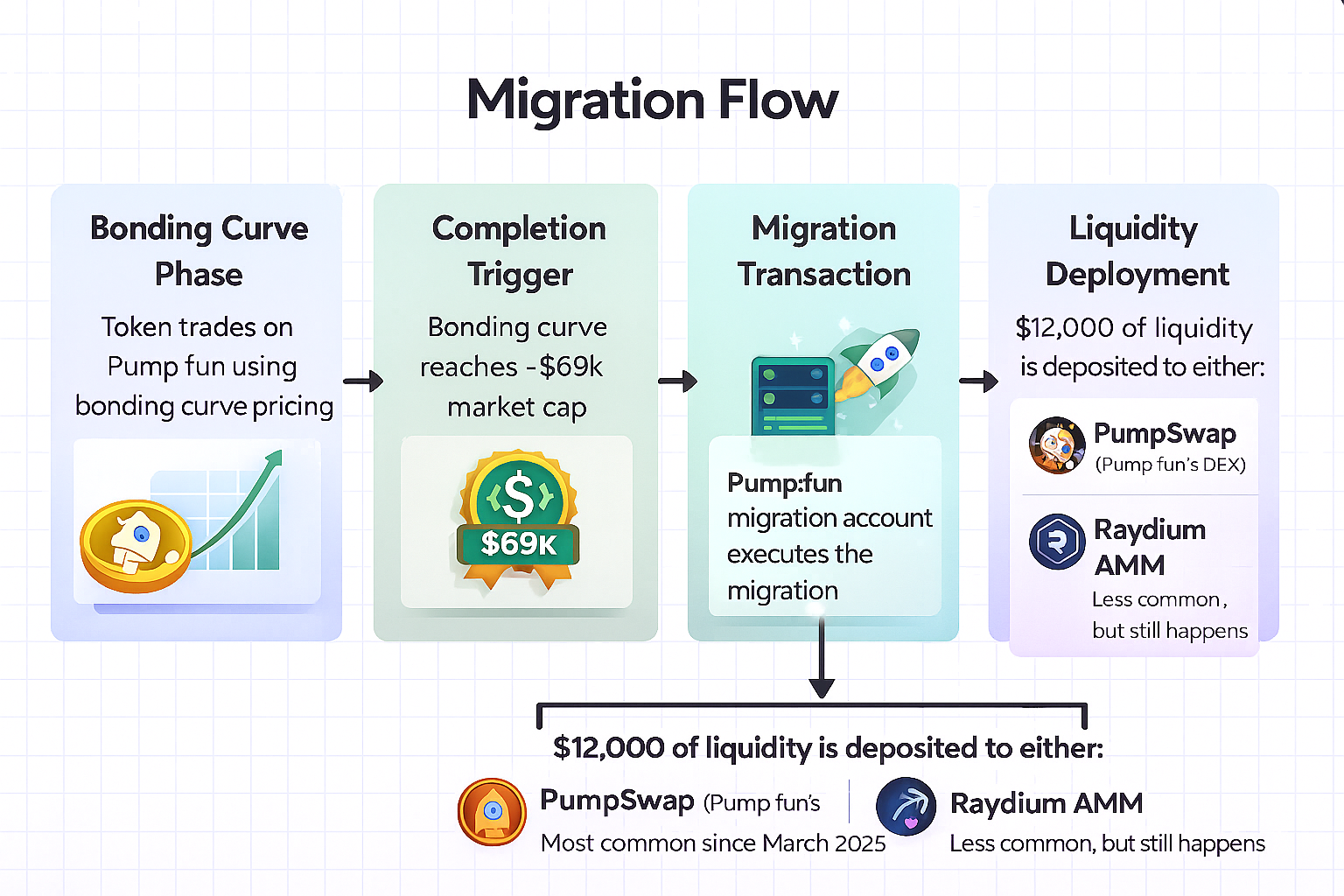
#### Migration Flow:
1. **Bonding Curve Phase**: Token trades on Pump.fun using bonding curve pricing
2. **Completion Trigger**: Bonding curve reaches \~$69k market cap
3. **Migration Transaction**: Pump.fun migration account executes the migration
4. **Liquidity Deployment**: $12,000 of liquidity is deposited into either:
* **PumpSwap** (Pump.fun's DEX) - Most common since March 2025
* **Raydium AMM** - Less common, but still happens
#### Key Addresses
| Program | Address |
| ----------------------------- | ---------------------------------------------- |
| **Pump.fun Program** | `6EF8rrecthR5Dkzon8Nwu78hRvfCKubJ14M5uBEwF6P` |
| Pump.fun Migration Account | `39azUYFWPz3VHgKCf3VChUwbpURdCHRxjWVowf5jUJjg` |
| **Raydium Liquidity Pool V4** | `675kPX9MHTjS2zt1qfr1NYHuzeLXfQM9H24wFSUt1Mp8` |
{% hint style="info" %}
The Pump.fun migration account manages both types of migrations.
* For PumpSwap migrations, it calls `migrate` instruction on the Pump.fun program.
* For Raydium migrations, it calls the `initialize2` instruction on Raydium's Liquidity Pool V4 program.
{% endhint %}
In this guide, you will learn how to:
* Get a GetBlock Access Token for Solana's API endpoint
* Build a WebSocket listener that detects Pump.fun migrations to both PumpSwap and Raydium
* Process transaction logs to extract token and pool information
* Distinguish between PumpSwap and Raydium migrations
* Handle reconnections and error scenarios
* Display migration data in a user-friendly format
### Prerequisites
* Basic understanding of JavaScript
* A GetBlock [account](https://account.getblock.io/sign-up)
* Node.js installed (v18 or higher)
### Technology Stack
* **Node.js**: JavaScript runtime environment for building server applications
* [**@solana/web3.js**:](https://npmjs.com/package/@solana/web3.js) Official Solana JavaScript SDK for blockchain interactions
* [**ws**](https://npmjs.com/package/ws): WebSocket client library for real-time connections
* [**dotenv**](https://npmjs.com/package/dotenv): Environment variable management for secure configuration
### Step 1: Project Initialization
1. Set up your project directory using this command:
```bash
# Create project folder
mkdir pumpfun-migrations-listener
cd pumpfun-migrations-listener
# Initialize npm
npm init -y
```
2. Install Dependencies:
```bash
npm install @solana/web3.js ws dotenv
```
3. Configure `package.json`:
```json
{
"name": "pumpfun-migrations-listener",
"version": "1.0.0",
"type": "module",
"description": "Real-time listener for Pump.fun migrations to PumpSwap and Raydium",
"main": "server.js",
"scripts": {
"start": "node server.js"
},
"keywords": ["pump.fun", "pumpswap", "raydium", "solana", "getblock"],
"author": "GetBlock",
"license": "MIT",
"dependencies": {
"@solana/web3.js": "^1.98.4",
"dotenv": "^17.2.3",
"ws": "^8.18.3"
}
}
```
* `"type": "module"` - Enables ES6 import/export syntax (required for modern JavaScript)
* `"main": "server.js"` - Specifies entry point of your application
* `"scripts"` - Defines shortcuts like `npm start`
### Get GetBlock's API Access Token
1. Log in to your [GetBlock account](https://account.getblock.io/)
2. On your dashboard, scroll and click on **Get Endpoint**
3. Select the **Solana Mainnet** network
4. Under API Interface, select **WebSocket (wss\://)**
5. Click on **Create** to get your endpoint
Your WebSocket endpoint will look like:
```bash
wss://shared.us-east-1.getblock.io/
```
6. Also get the HTTP endpoint for transaction fetching:
* Return to the dashboard
* Select **JSON-RPC (https\://)** under API Interface
* Click **Create**
Your HTTP endpoint will look like:
```bash
https://shared.us-east-1.getblock.io/
```
7. Save both endpoints in a `.env` file in your project root:
```bash
GETBLOCK_WS_ENDPOINT=wss://shared.us-east-1.getblock.io/
GETBLOCK_HTTP_ENDPOINT=https://shared.us-east-1.getblock.io/
```
{% hint style="warning" %}
Keep your endpoints safe, as they contain your access token
{% endhint %}
### Project Structure
1. Create the following files to have a basic structure for your project:
```bash
pumpfun-migrations-listener/
├── server.js # Main application logic
├── .env # Environment variables (add to .gitignore)
├── .gitignore # Git ignore file
└── package.json # Project configuration
```
2. Create a `.gitignore` file:
```bash
node_modules/
.env
*.log
```
### Step 2: Server File Setup
{% hint style="success" %}
Your script will be written inside `server.js`
{% endhint %}
#### 1. Import Dependencies and Configuration
```javascript
import { Connection, PublicKey } from '@solana/web3.js';
import WebSocket from 'ws';
import dotenv from 'dotenv';
// Load environment variables
dotenv.config();
// Configuration
const WS_ENDPOINT = process.env.GETBLOCK_WS_ENDPOINT;
const HTTP_ENDPOINT = process.env.GETBLOCK_HTTP_ENDPOINT;
const MIGRATION_ACCOUNT = '39azUYFWPz3VHgKCf3VChUwbpURdCHRxjWVowf5jUJjg';
const RAYDIUM_PROGRAM = '675kPX9MHTjS2zt1qfr1NYHuzeLXfQM9H24wFSUt1Mp8';
const PUMPFUN_PROGRAM = '6EF8rrecthR5Dkzon8Nwu78hRvfCKubJ14M5uBEwF6P';
// Validate configuration
if (!WS_ENDPOINT || !HTTP_ENDPOINT) {
console.error('❌ Missing required environment variables');
console.error('Please set GETBLOCK_WS_ENDPOINT and GETBLOCK_HTTP_ENDPOINT in .env file');
process.exit(1);
}
console.log('✅ Configuration loaded successfully');
```
**What this does:**
* Imports necessary libraries for Solana interactions and WebSocket connections
* Loads API endpoints securely from environment variables
* Validates that the required configuration is present
* Defines the key addresses we'll monitor for migrations
* `MIGRATION_ACCOUNT` - This is the Pump.fun account that executes all migrations
* `RAYDIUM_PROGRAM` - The Raydium program ID to detect Raydium migrations.
* `PUMPFUN_PROGRAM` - The Pump.fun program ID to detect PumpSwap migrations.
#### 2. Create the Migration Listener Class
```javascript
class PumpFunMigrationListener {
constructor() {
this.ws = null;
this.connection = new Connection(HTTP_ENDPOINT, 'confirmed');
this.subscriptionId = null;
this.isConnected = false;
this.reconnectAttempts = 0;
this.maxReconnectAttempts = 10;
this.raydiumMigrationCount = 0;
this.pumpswapMigrationCount = 0;
this.migrations = [];
this.startTime = Date.now();
this.totalLogsReceived = 0;
}
```
**Breaking down the constructor:**
The constructor initializes all the state we need to track. Let me explain each property:
* `this.ws` - Will hold our WebSocket connection to GetBlock
* `this.connection` - HTTP connection for fetching full transaction details
* `this.subscriptionId` - The ID returned when we subscribe to logs
* `this.isConnected` - Boolean flag to track connection status
* `this.reconnectAttempts` - Counter for reconnection attempts (we limit it to 10)
* `this.raydiumMigrationCount` & `this.pumpswapMigrationCount` - Separate counters for each migration type
* `this.migrations` - Array to store all detected migrations
* `this.startTime` - Timestamp when listener started (for runtime tracking)
* `this.totalLogsReceived` - Counter for all logs received (helps with debugging)
#### 3. Create an Interval check
```javascript
start() {
console.log('🚀 Starting Pump.fun Migration Listener...');
console.log('📡 Monitoring account:', MIGRATION_ACCOUNT);
console.log('🎯 Tracking: Raydium + PumpSwap migrations');
console.log('');
this.connect();
this.checkRunning();
}
checkRunning() {
setInterval(() => {
const runtime = Math.floor((Date.now() - this.startTime) / 1000);
const hours = Math.floor(runtime / 3600);
const minutes = Math.floor((runtime % 3600) / 60);
const seconds = runtime % 60;
console.log(`💓 Alive | Runtime: ${hours}h ${minutes}m ${seconds}s | Logs: ${this.totalLogsReceived} | Raydium: ${this.raydiumMigrationCount} | PumpSwap: ${this.pumpswapMigrationCount}`);
}, 60000);
}
```
**What this does:**
* The `start()` method kicks everything off. It checks if the Websocket is connected or not.
* The `checkRunning()` method creates a timer that runs every 60 seconds (60000 milliseconds). This serves two purposes:
1. It shows the listener is still running
2. It provides statistics: runtime, total logs received, and migrations detected by type
{% hint style="success" %}
Migration isn't frequent and may not occur within an hour. This is good for debugging—if no logs appear, it's a sign there's an issue with the subscription. This ensures that monitoring is active.
{% endhint %}
#### 4. Create GetBlock Websocket Connection
```javascript
connect() {
console.log('🔌 Connecting to GetBlock WebSocket...');
this.ws = new WebSocket(WS_ENDPOINT);
this.ws.on('open', () => this.handleOpen());
this.ws.on('message', (data) => this.handleMessage(data));
this.ws.on('error', (error) => this.handleError(error));
this.ws.on('close', () => this.handleClose());
}
handleOpen() {
console.log('✅ Connected to GetBlock WebSocket');
this.isConnected = true;
this.reconnectAttempts = 0;
this.subscribeToLogs();
}
```
**What this does:**
* The `connect()` method creates a new WebSocket connection to GetBlock. Then it sets up four event listeners:
* `open` - Called when the connection is established
* `message` - Called whenever we receive data
* `error` - Called if something goes wrong
* `close` - Called when the connection drops
* When the connection opens, `handleOpen()` runs. It sets `isConnected` to true, resets the reconnection counter (since you've successfully connected), and most importantly, subscribes to the logs you need.
#### 5. Subscribe to Migration Events
```javascript
subscribeToLogs() {
const subscribeRequest = {
jsonrpc: '2.0',
id: 1,
method: 'logsSubscribe',
params: [
{
mentions: [MIGRATION_ACCOUNT]
},
{
commitment: 'confirmed'
}
]
};
console.log('📡 Subscribing to migration events...');
this.ws.send(JSON.stringify(subscribeRequest));
}
```
What this does:
* Uses Solana's `logsSubscribe` method to monitor transactions
* Filters for transactions mentioning the Pump.fun migration account
* Uses `confirmed` commitment for faster notifications (1-2 seconds)
#### 6. Handle Incoming Messages
```javascript
async handleMessage(data) {
try {
const message = JSON.parse(data.toString());
if (message.result && !message.params) {
this.subscriptionId = message.result;
console.log(`✅ Subscribed with ID: ${this.subscriptionId}`);
console.log('⏳ Listening for migrations...\n');
return;
}
if (message.params && message.params.result) {
await this.processLog(message.params.result);
}
} catch (error) {
console.error('❌ Error handling message:', error.message);
}
}
```
What this does:
* Parses incoming WebSocket messages
* Handles subscription confirmation and stores subscription ID
* Processes log notifications for migration detection
#### 7. Process Transaction Logs
```javascript
async processLog(result) {
const { value } = result;
this.totalLogsReceived++;
console.log(`📨 Log #${this.totalLogsReceived} - TX: ${value.signature.substring(0, 20)}...`);
if (value.err) {
console.log(' ↳ Skipped (failed transaction)');
return;
}
const hasMigration = value.logs.some(
(log) =>
log.includes("Instruction: Migrate") ||
log.includes("migrate") ||
log.includes("initialize2")
);
if (hasMigration) {
console.log(" ↳ 🎯 MIGRATION DETECTED!");
await this.fetchAndProcessTransaction(value.signature);
} else {
console.log(" ↳ Not a migration");
}
}
```
What this does:
* Checks transaction logs for migration keywords like:\

* Skips failed transactions
* Fetches full transaction details when migration is detected
#### 8. Fetch Full Transaction Details
```javascript
async fetchAndProcessTransaction(signature) {
try {
await new Promise((resolve) => setTimeout(resolve, 1000));
const tx = await this.connection.getTransaction(signature, {
maxSupportedTransactionVersion: 0,
commitment: 'confirmed'
});
if (!tx) {
console.log('⚠️ Transaction not found, skipping...');
return;
}
const migrationData = this.extractMigrationData(tx, signature);
if (migrationData) {
this.migrations.push(migrationData);
if (migrationData.type === 'raydium') {
this.raydiumMigrationCount++;
} else if (migrationData.type === 'pumpswap') {
this.pumpswapMigrationCount++;
}
this.displayMigration(migrationData);
}
} catch (error) {
console.error('❌ Error fetching transaction:', error.message);
}
}
```
What this does:
* Waits 1 second for the transaction to propagate
* Fetches complete transaction from Solana via HTTP
* Extracts and displays migration data
#### 9. Extract Migration Data
```javascript
extractMigrationData(tx, signature) {
try {
let accountKeys, instructions;
if (tx.transaction.message.addressTableLookups) {
accountKeys = tx.transaction.message.staticAccountKeys ||
tx.transaction.message.accountKeys;
instructions = tx.transaction.message.compiledInstructions ||
tx.transaction.message.instructions;
} else {
accountKeys = tx.transaction.message.accountKeys;
instructions = tx.transaction.message.instructions;
}
if (!Array.isArray(instructions)) {
instructions = Object.values(instructions);
}
for (const instruction of instructions) {
let programId;
if (instruction.programIdIndex !== undefined) {
programId = accountKeys[instruction.programIdIndex];
} else if (instruction.programId) {
programId = instruction.programId;
}
// Check for Raydium migration
if (programId && programId.toString() === RAYDIUM_PROGRAM) {
const accounts = instruction.accounts;
if (!accounts || accounts.length < 7) continue;
return {
type: 'raydium',
signature: signature,
slot: tx.slot,
blockTime: tx.blockTime,
poolAddress: accountKeys[accounts[1]].toString(),
tokenAddress: accountKeys[accounts[5]].toString(),
quoteMint: accountKeys[accounts[6]].toString(),
lpMint: accountKeys[accounts[4]].toString(),
};
}
// Check for PumpSwap migration
if (programId && programId.toString() === PUMPFUN_PROGRAM) {
return {
type: 'pumpswap',
signature: signature,
slot: tx.slot,
blockTime: tx.blockTime,
tokenAddress: accountKeys[2] ? accountKeys[2].toString() : 'Unknown',
bondingCurve: accountKeys[1] ? accountKeys[1].toString() : 'Unknown',
destination: 'PumpSwap',
};
}
}
} catch (error) {
console.error('❌ Error extracting migration data:', error.message);
}
return null;
}
```
What this does:
* Handles both versioned and legacy Solana transactions
* Detects Raydium migrations by checking for Raydium program ID
* Detects PumpSwap migrations by checking for Pump.fun program ID
* Extracts relevant addresses (token, pool, LP mint)
#### 10. Display Migration Results
```javascript
displayMigration(data) {
if (data.type === 'raydium') {
console.log('\n🚀 ═══════════════════════════════════════════════════');
console.log(' NEW PUMP.FUN → RAYDIUM MIGRATION DETECTED!');
console.log('═══════════════════════════════════════════════════\n');
console.log(`Migration #${this.raydiumMigrationCount} (Raydium)\n`);
console.log(`📊 Token Address: ${data.tokenAddress}`);
console.log(`🏊 Pool Address: ${data.poolAddress}`);
console.log(`💧 LP Mint: ${data.lpMint}`);
console.log(`💰 Quote Token: ${data.quoteMint}\n`);
console.log(`📝 Transaction: ${data.signature}`);
console.log(`🔢 Slot: ${data.slot}`);
if (data.blockTime) {
console.log(`⏰ Time: ${new Date(data.blockTime * 1000).toISOString()}`);
}
console.log(`\n🔗 View on Solscan:`);
console.log(` https://solscan.io/tx/${data.signature}\n`);
console.log(`🔗 Trade on Raydium:`);
console.log(` https://raydium.io/swap/?inputMint=sol&outputMint=${data.tokenAddress}\n`);
console.log('═══════════════════════════════════════════════════\n');
} else if (data.type === 'pumpswap') {
console.log('\n💧 ═══════════════════════════════════════════════════');
console.log(' NEW PUMP.FUN → PUMPSWAP MIGRATION DETECTED!');
console.log('═══════════════════════════════════════════════════\n');
console.log(`Migration #${this.pumpswapMigrationCount} (PumpSwap)\n`);
console.log(`📊 Token Address: ${data.tokenAddress}`);
console.log(`🎯 Bonding Curve: ${data.bondingCurve}`);
console.log(`🏪 Destination: ${data.destination}\n`);
console.log(`📝 Transaction: ${data.signature}`);
console.log(`🔢 Slot: ${data.slot}`);
if (data.blockTime) {
console.log(`⏰ Time: ${new Date(data.blockTime * 1000).toISOString()}`);
}
console.log(`\n🔗 View on Solscan:`);
console.log(` https://solscan.io/tx/${data.signature}\n`);
console.log(`🔗 View Token:`);
console.log(` https://pump.fun/${data.tokenAddress}\n`);
console.log('═══════════════════════════════════════════════════\n');
}
}
```
What this does:
* Displays Raydium migrations with pool and LP mint info
* Displays PumpSwap migrations with bonding curve info
* Provides links to Solscan and trading platforms
#### 11. Handle Reconnections
```javascript
handleError(error) {
console.error('❌ WebSocket error:', error.message);
}
handleClose() {
this.isConnected = false;
console.log('🔌 Connection closed');
if (this.reconnectAttempts < this.maxReconnectAttempts) {
this.reconnectAttempts++;
const delay = Math.min(1000 * Math.pow(2, this.reconnectAttempts), 30000);
console.log(`🔄 Reconnecting in ${delay / 1000}s (attempt ${this.reconnectAttempts}/${this.maxReconnectAttempts})...`);
setTimeout(() => {
this.connect();
}, delay);
} else {
console.error('❌ Max reconnection attempts reached. Exiting...');
process.exit(1);
}
}
stop() {
console.log('👋 Stopping listener...');
if (this.ws) {
this.ws.close();
}
}
}
```
What this does:
* Implements exponential backoff for reconnections (2s, 4s, 8s, etc.)
* Caps reconnection delay at 30 seconds
* Exits after 10 failed reconnection attempts
#### 12. Initialize and Run
```javascript
const listener = new PumpFunMigrationListener();
listener.start();
process.on('SIGINT', () => {
console.log('\n👋 Shutting down...');
listener.stop();
process.exit(0);
});
process.on('SIGTERM', () => {
listener.stop();
process.exit(0);
});
process.on('uncaughtException', (error) => {
console.error('💥 Uncaught exception:', error);
listener.stop();
process.exit(1);
});
process.on('unhandledRejection', (error) => {
console.error('💥 Unhandled rejection:', error);
listener.stop();
process.exit(1);
});
```
What this does:
* Handles graceful shutdown on Ctrl+C
* Catches uncaught errors
### Step 4: Testing Your Listener
Start your migration listener:
```bash
npm start
```
Expected Output:
```
✅ Configuration loaded successfully
🚀 Starting Pump.fun Migration Listener...
📡 Monitoring account: 39azUYFWPz3VHgKCf3VChUwbpURdCHRxjWVowf5jUJjg
🎯 Tracking: Raydium + PumpSwap migrations
🔌 Connecting to GetBlock WebSocket...
✅ Connected to GetBlock WebSocket
📡 Subscribing to migration events...
✅ Subscribed with ID: 17473
⏳ Listening for migrations...
```
#### Test 1: Real-time PumpSwap Migration
When a token migrates to PumpSwap:
```bash
📨 Log #4 - TX: 2QAbbdjj8P5qk3gzoey5...
📊 Token Address: 3MSQF3mHFL9CuzKtUg6zp3GDdmGgDpPs7tQ1VPoXabTq
🎯 Bonding Curve: 39azUYFWPz3VHgKCf3VChUwbpURdCHRxjWVowf5jUJjg
🏪 Destination: PumpSwap
📝 Transaction: G6YuhMQtC5vonGFDwGDUsy5Uukb7JvkzQeB91FDfbRCYL8fNzvig4so4ZXVnqWNsNZWjLWf2rs5xf55KDZ7wXTW
🔢 Slot: 382201040
⏰ Time: 2025-11-24T12:30:13.000Z
🔗 View on Solscan:
https://solscan.io/tx/G6YuhMQtC5vonGFDwGDUsy5Uukb7JvkzQeB91FDfbRCYL8fNzvig4so4ZXVnqWNsNZWjLWf2rs5xf55KDZ7wXTW
🔗 View Token:
https://pump.fun/3MSQF3mHFL9CuzKtUg6zp3GDdmGgDpPs7tQ1VPoXabTq
```
#### Test 2: Real-time Raydium Migration
When a token migrates to Raydium (rare):
```
📨 Log #7 - TX: 5yK8TqPAL2kNXj9bVZmF...
↳ 🎯 MIGRATION DETECTED!
🚀 ═══════════════════════════════════════════════════
NEW PUMP.FUN → RAYDIUM MIGRATION DETECTED!
═══════════════════════════════════════════════════
Migration #1 (Raydium)
📊 Token Address: 8sLbNZoA1cfnvMJLPfp98ZLAnFSYCFApfJKMbiXNLwxj
...
```
#### Test 3: Check if alive
Every minute:
```
💓 Alive | Runtime: 0h 15m 30s | Logs: 23 | Raydium: 1 | PumpSwap: 18
```
### Troubleshooting
1\. Missing access token or Connection error
```javascript
//Missing api key or environment variable
❌ Missing required environment variables
Please set GETBLOCK_WS_ENDPOINT and GETBLOCK_HTTP_ENDPOINT in .env file
//Connection error(403)
🔌 Connecting to GetBlock WebSocket...
❌ WebSocket error: Unexpected server response: 403
🔌 Connection closed
```
This means that:
* You haven't set up your environment variable as follows in this guide
* Your Access token is incorrect or incomplete
2\. Only seeing PumpSwap migrations or no migration at all
This is expected. Since March 2025, most tokens (95%+) have migrated to PumpSwap instead of Raydium. Also, migration doesn't happen frequently.
3. Not receiving any logs
**Solution**:
* Verify subscription succeeded (you should see `✅ Subscribed with ID`)
* Check GetBlock dashboard for API usage limits
* Verify transactions exist at [Solscan](https://solscan.io/account/39azUYFWPz3VHgKCf3VChUwbpURdCHRxjWVowf5jUJjg)
### Conclusion
In this guide, you've built an app that listens to Pump.fun token migrations to both PumpSwap and Raydium using GetBlock's Solana infrastructure. You learn:
* How to connect to GetBlock's WebSocket API for real-time blockchain data
* How to subscribe to specific account activities on Solana
* How to distinguish between PumpSwap and Raydium migrations
* How to extract token addresses and pool information from transactions
* How to handle versioned Solana transactions
* How to implement robust reconnection logic
### Additional Resources
* [Solana Web3.js Documentation](https://solana-foundation.github.io/solana-web3.js/)
* [Raydium SDK](https://github.com/raydium-io/raydium-sdk)
* [Pump.fun Platform](https://pump.fun/)