> For the complete documentation index, see [llms.txt](https://docs.getblock.io/llms.txt). Markdown versions of documentation pages are available by appending `.md` to page URLs; this page is available as [Markdown](https://docs.getblock.io/getting-started/endpoint-setup/enabling-archive-mode.md).
# Enabling archive mode
Enable Archive Mode on your GetBlock Shared Node API to access the full blockchain history and run historical queries
GetBlock provides direct access to blockchain historical states through both the Dedicated Nodes service and archive-enabled Shared RPC endpoints.
This page covers **Archive Mode** – a setting that turns on archive-node access within GetBlock’s **Shared Nodes subscription**.
Common RPC use cases enabled by Archive Mode:
* Read contract/account state at any past block, not just `latest` , using methods like [`eth_getBalance`](broken://pages/OvREWedjZcQXOfAINKFw)`(address, blockNumber)`, [`eth_getStorageAt`](broken://pages/Z0x91Xd7rpVHeey1bVlX)`(contract, slot, blockNumber)`, [`eth_getCode`](broken://pages/7DySAS1tp87clonhiSNK)`(address, blockNumber)`, etc.
* Call view functions against historical state: e.g. [`eth_call`](broken://pages/wdvTR5ND1nsYC5wFdcMi)`(..., blockNumber)`.
* Run historical queries and debugging that rely on old state: forensics, audits, explorers, indexing, and retroactive analytics.
* Support tracing and higher-fidelity debugging that may require historical state.
This feature removes the need to run a dedicated archive infrastructure for some use cases, letting developers perform on-demand historical queries via GetBlock RPC API.
***
### Archive mode availability & coverage
Archive functionality is included with **all Shared Node subscriptions**, excluding the Free plan. No additional fee required.
Archive support is provided for a set of popular protocol **mainnets**, including Ethereum, BSC, Polygon, Base, Arbitrum, TRON, Sui, Cardano, etc.
Look for the small history icon ( ) when picking a protocol during the [endpoint setup](/getting-started/endpoint-setup/creating-node-endpoints.md). It indicates that Archive mode is available for that blockchain.
{% hint style="success" %}
If you need an archive data for a chain not covered by shared Archive mode, request a [Dedicated Node](/getting-started/endpoint-setup/configuring-dedicated-nodes.md). **Dedicated Nodes** can be deployed in archive mode for **any supported blockchain** and come with additional benefits like:
1. Full blockchain history at the highest throughput
2. Unlimited query capacity
3. Custom node builds & tooling
{% endhint %}
***
### How to enable the Archive mode
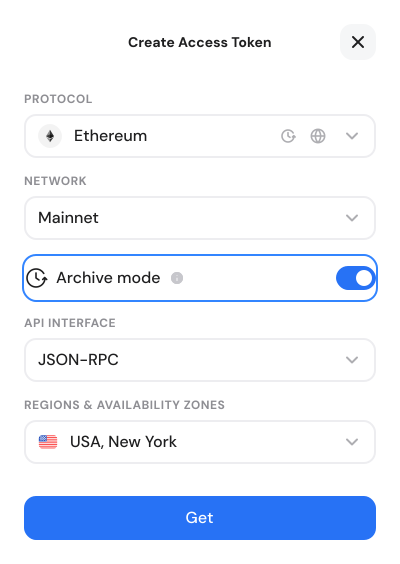
1. Sign in to your GetBlock **dashboard** and make sure you’re on the **Shared Node** tab.
2. Click **Get endpoint** and choose a required blockchain protocol.
3. Find the Mode toggle and switch the **Archive** **mode** on.
3. Finish configuring endpoint details by choosing the API interface and server location as usual.
After clicking **Get**, the new Archive endpoint appears in your Endpoints list. The endpoint URLs will follow the existing GetBlock format but point to archive nodes.
***
### CU billing for Shared Archive endpoints
Archive endpoints usage remains subject to your plan’s [CU limits and performance characteristics](https://docs.getblock.io/getting-started/plans-and-limits/cu-and-rate-limits).
However, serving requests from archive infrastructure involves heavier storage and compute power compared to regular full nodes.
Therefore, enabling the Archive mode affects how CU usage is calculated:
* GetBlock applies a **2× Compute Unit (CU) multiplier** to all requests made through the Archive endpoint.
* The multiplier is applied to **all requests made to an archive endpoint**, even if the invoked RPC call does not require a historical state.
You can review the per-chain CU values for each method on our [Compute Units](https://getblock.io/pricing/compute-units/) page.
> Example:
>
> If `eth_getBalance` costs 20 CU on a standard shared endpoint for a given chain, the same call to an Archive-enabled shared endpoint will cost 40 CU.
Plan accordingly and consider using standard **Full mode** endpoints for non-archive traffic to avoid unnecessary CU consumption.
***
### Best practices
* Use archive endpoints only for workloads that require a historical state. For transactions or current state queries, use a standard Full mode to save CU.
* Monitor CU consumption on the dashboard and set alerts for spikes or when usage nears your plan limit.
* If you run sustained, high-volume archive queries, consider using a Dedicated Node.
***
#### 💬 Need help with archive blockchain data?
[Tell us](https://getblock.io/contact/) what you’re building — our team can guide you to the most efficient archive node setup.

 ) when picking a protocol during the [endpoint setup](/getting-started/endpoint-setup/creating-node-endpoints.md). It indicates that Archive mode is available for that blockchain.